How to Create a Standard Merge Request Description Template
Optimize your collaborative software development with a comprehensive guide to creating standard & efficient merge requests.
Introduction
The merge request process is a critical aspect of collaborative software development. To standardize and streamline this process, it's essential to have a clear and comprehensive merge request description template. In this blog post, we will guide you on how to create and implement a standard merge request description template, ensuring that your team follows a consistent and efficient workflow.
Setting Up the Default Description Template
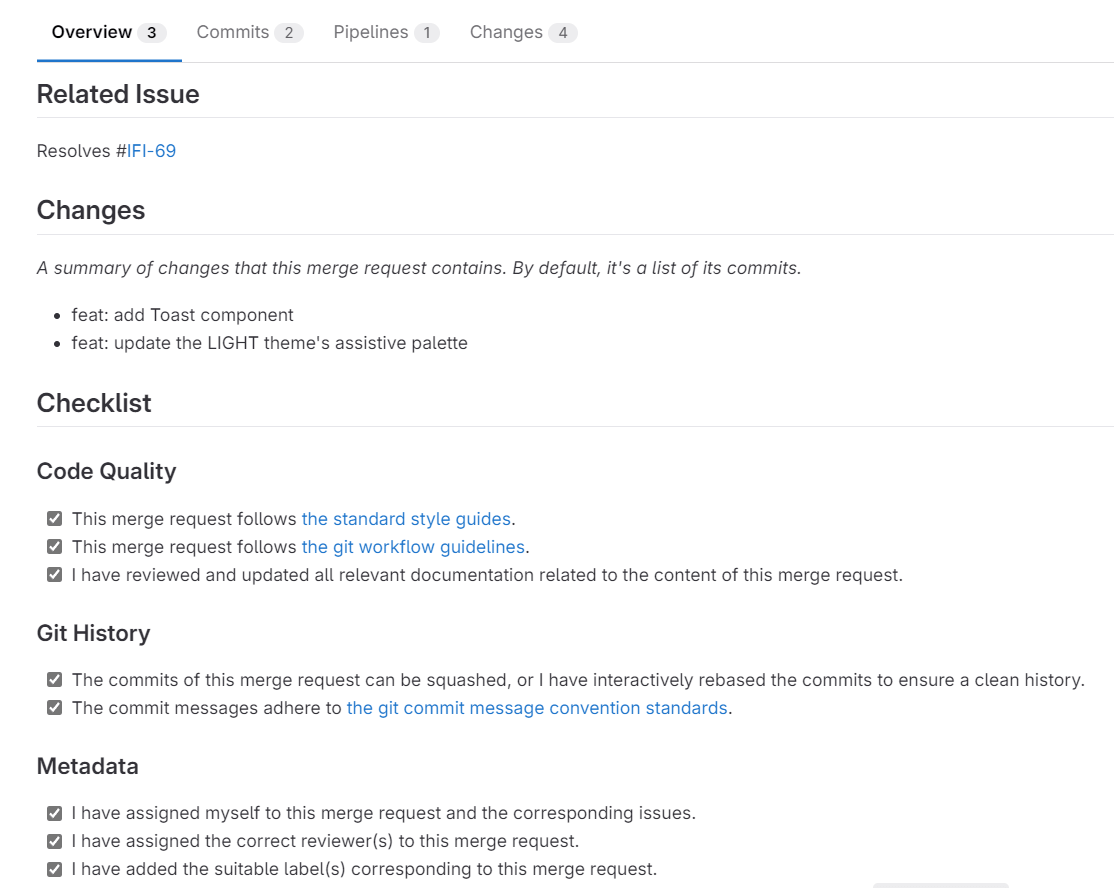
The first step is to insert the following code into the default description template settings for merge requests in your repository.
## Related Issue

Resolves #ISSUE-IDENTIFIER[S]

## Changes

_A summary of changes that this merge request contains. By default, it's a list of its commits._

%{all_commits}

## Checklist

### Quality & Ownership

- [ ] The total line changes (additions + deletions) do not exceed 1,500 lines (ideally under 1,000).
- [ ] This PR follows the [front-end chapter style guides](LINK_TO_STYLE_GUIDE_DOCUMENTATION)
- [ ] This PR follows the [front-end chapter git workflow guidelines](LINK_TO_GIT_WORKFLOW_DOCUMENTATION)
- [ ] I have reviewed and updated all relevant documentation related to the content of this merge request.
- [ ] I have reviewed all diffs and changes in this merge request and confirm there is nothing unintentional or unrelated included, such as:
    - Leftover console logs
    - Debugger statements
    - Commented-out code
    - Code smell comments
    - Accidental file addition/deletion
    - Common review feedbacks
    - etc.
- [ ] I take full ownership and responsibility for all code in this merge request, including any AI-generated or externally sourced content.

### Git History

- [ ] The commits of this merge request can be squashed, or I have interactively rebased the commits to ensure a clean history.
- [ ] The commit messages adhere to [the git commit message convention standards](LINK_TO_COMMIT_CONVENTION_DOCUMENTATION).

### Workflow & Tracking

- [ ] I have assigned myself to this merge request and the corresponding issues.
- [ ] I have assigned the correct reviewer(s) and added the suitable label(s).
- [ ] I have mentioned any related or dependent merge requests in the `dependencies` section.
- [ ] I have added the **Draft** prefix (not ready to merge) or **WIP** prefix (not ready for review) if applicable.
- [ ] I have attached the Figma design or screenshot (if available) to the issue or [Additional Notes section](#additional-notes).

### Verification

- [ ] All tests have been successfully completed.
- [ ] The app has been built successfully.

## Additional Notes

...
Setup Guide
The setup process varies depending on whether you are utilizing GitLab or GitHub. If you are using GitLab, refer to the 'Description templates' documentation, while for GitHub, explore the guidelines in the 'Creating a pull request template for your repository' document.
Documentations
Feel free to replace these with the actual URLs:
-
LINK_TO_STYLE_GUIDE_DOCUMENTATION -
LINK_TO_GIT_WORKFLOW_DOCUMENTATION -
LINK_TO_COMMIT_CONVENTION_DOCUMENTATION
Checklist
While submitting a merge request, check all the checklist items accurately; otherwise, reviewers won't review/approve/merge your merge request assuming there is work in progress. Additionally, remember to review the checklist items whenever you push changes to the merge request. For a deeper understanding of the significance of checklists, you can refer to "The Checklist Manifesto" by Atul Gawande.
Why Checklists Matter
In "The Checklist Manifesto," surgeon Atul Gawande demonstrates how simple checklists dramatically reduce errors in complex fields like aviation, construction, and medicine. The same principle applies to software development.
Modern codebases are too complex for any single developer to manage perfectly from memory. Mistakes in merge requests often aren't from lack of skill—they're from ineptitude: forgetting to remove a console log, skipping documentation updates, or missing a test case. These aren't knowledge gaps; they're human lapses.
A merge request checklist works because it:
- Catches routine oversights before they reach reviewers
- Establishes shared standards across the team
- Gives everyone permission to enforce quality—when the checklist says "no console logs," it's not personal nitpicking
A word of caution: Checklists only work if you actually use them. Don't just tick items mechanically to get through the process. Each time you go through the checklist, forget your assumptions, set aside the "I already know this" bias, and read every single item as if it's your first time. The moment a checklist becomes a mindless ritual, it loses all its power. Engage with each point deliberately—that's where the value lies.
The checklist above isn't about distrusting developers. It's about freeing them to focus on the hard problems—architecture decisions, edge cases, performance—by ensuring the routine stuff doesn't slip through. As Gawande puts it: the discipline of the checklist is a form of humility about human limitations.
Understanding Labels
Labels play a crucial role in organizing work and tracking merge requests and issues. It is essential to add the necessary labels to the repository settings and use them appropriately for each merge request based on your requirements. Below are some commonly utilized labels:
- bug: Indicates a bug fix.
- critical: Indicates a critical bug fix (hotfix).
- documentation: Indicates adding or improving documentation.
- enhancement: Indicates an enhancement to the codebase.
- feature: Indicates a new feature.
- refactor: Indicates a refactor or clean-up.
- test: Indicates a test.
- help wanted: Indicates a need for guidance.
- need more info: Indicates that the merge reviewers need more information, and the standards of the current chapter are not provided.
- duplicate: Indicates that a similar merge request already exists.
Interactive Rebasing for Clean Git History
A clean git history enhances the readability and maintainability of your project. Learn about interactive rebasing through this informative YouTube video: "Learn how to rewrite Git history". Additionally, if you're a VSCode user, check out this video: "Git Rebase & Squash in VS Code using GitLens Supercharge".
Conclusion
Ensuring a standardized merge request structure is a crucial step toward maintaining an organized and efficient development workflow. By following these practices, your team can ensure transparency, collaboration, and high-quality code contributions from your team.